
Before You Cancel...
Cancelling your membership means losing access to a few things Insiders count on:
- Discounts on tackle and outdoor gear through the Fish Strong store and your Sportsman's Guide Buyer's Club membership, included free with your Insider's Club subscription.
- The Salt Strong community, including the local knowledge and relationships built with other Insiders who fish the same waters you do.
If you're cancelling because of an issue we can fix, whether that's a technical problem, a billing question, or something about the membership itself, reach out to us first at fish@saltstrong.com. We'd rather help you fix the issue than see you leave.
How to Tell Which Procedure Applies to You
- If you signed up at saltstrong.com use Option 1 below.
- If you signed up and pay through the Apple App Store or Google Play (for example, through the Salt Strong app on your phone), use Option 2 below.
If you're not sure which applies to you, check your bank or card statement for the name of the charge, or check your Apple/Google subscriptions list. If you still can't tell, email us at fish@saltstrong.com and we'll help you sort it out.
Option 1: You Signed Up on Our Website
If you signed up directly through saltstrong.com, you can cancel through your Member Portal:
1. Log in to your Salt Strong membership account at www.saltstrong.com.
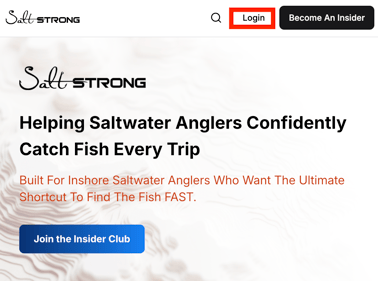
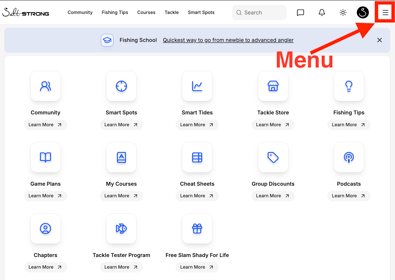
2. Click Menu.
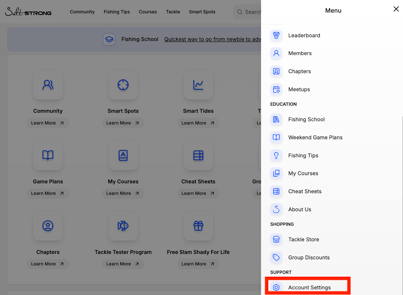
3. Select Account Settings (scroll toward the bottom of the menu).
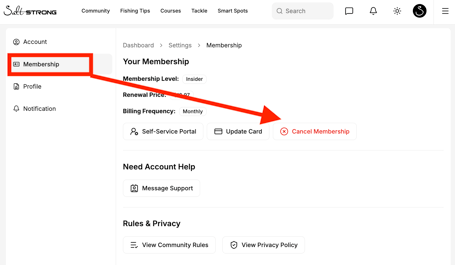
4. Click Membership (If you don't see the Membership tab, tap the book icon in the top-left corner first) and choose the Cancel Membership option.
5. Based on how you signed up, you may see a small pop-up window. Select the Cancel Subscription link to access the cancellation form.
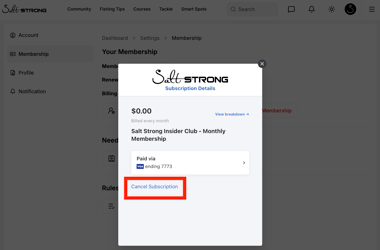
Once you've selected Cancel Membership, simply follow the remaining prompts to complete the cancellation process. Be sure to finish all of the steps to ensure your membership has been successfully cancelled.
Option 2: You Signed Up Through the Apple App Store or Google Play
If you subscribed through an app store, your subscription is managed by Apple or Google, not by us. For your security, we don't have access to your app store account, so we're not able to cancel or refund the subscription on our end. You'll need to cancel directly through the store you signed up with.
Apple App Store
Google Play
Refunds for app store purchases are issued by Apple or Google according to their own policies, not by Salt Strong. Use the refund links above to submit a request directly to them.
Still Need Help?
If you run into any issues, aren't sure which option applies to you, or the steps above don't match what you're seeing on your screen, email us at fish@saltstrong.com. We're happy to help.